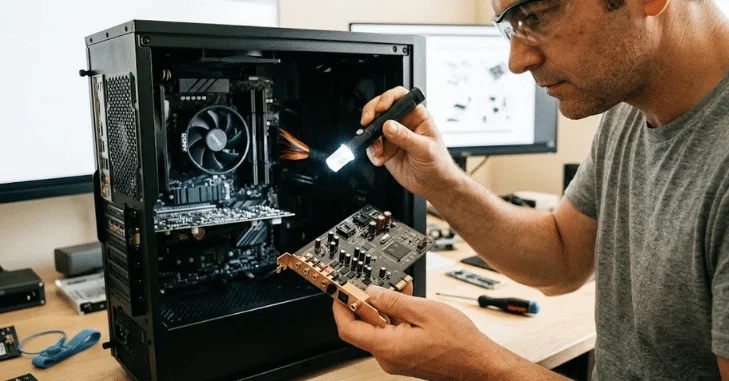
A sound card handles a computer’s audio input and output. It converts digital audio into signals your headphones or speakers can play. It can also turn microphone signals into digital information your computer can record.
Direct answer: A sound card is computer audio hardware that converts digital audio into analog signals for speakers and headphones. It also converts microphone signals into digital data for recording. Most modern PCs already include this function on the motherboard, so a separate card is optional for most users.
Sound Hardware at a Glance
| Feature | What it means |
|---|---|
| Main purpose | Handles computer audio input and output |
| Core components | DAC, ADC, amplifier, audio processor |
| Common formats | Integrated, internal PCIe, external USB |
| Typical outputs | 3.5mm, optical, surround outputs |
| Typical inputs | Microphone, line input, USB |
| Best for most users | Integrated motherboard audio |
| Upgrade reasons | Better headphones, recording, extra ports, noisy onboard audio |
| Common alternatives | USB DAC, headphone amplifier, audio interface |
Key Takeaways
- Most modern computers already include onboard audio.
- A dedicated audio device is not necessary for everyday computer use.
- Better hardware can reduce noise and support demanding headphones.
- Recording setups often benefit more from an external audio interface.
- Internal PCIe models remain useful when you want extra desktop audio features.
- Your headphones, speakers, and microphone should guide any upgrade decision.
How a Sound Card Works
Computer audio starts as digital information. Speakers and traditional wired headphones need an analog electrical signal. A digital-to-analog converter, or DAC, performs that conversion.
Microphone recording works in the opposite direction. An analog-to-digital converter, called an ADC, changes incoming audio into digital data. Recording software can then store, process, or stream that information.
Many audio devices also contain an amplifier. It provides enough power for headphones or connected equipment. Some models add processing for equalization, surround effects, microphone controls, or virtual spatial audio.
This process happens quickly enough to feel immediate. You play a video, and the computer sends digital audio toward its output hardware. The converted signal then reaches your speakers or headphones.
TechTarget describes the same basic DAC and ADC process in its computer audio definition. TechTerms also notes that modern motherboards commonly integrate these audio functions.
The Three Main Types of Computer Audio Hardware
Integrated Motherboard Audio
Integrated audio is built directly into the motherboard. This setup is standard on modern desktops and laptops. It provides enough quality for calls, videos, games, music, and everyday headphones.
You can usually identify its connectors on a desktop’s rear panel. Green commonly marks stereo output, while pink often marks microphone input. Additional connectors may support line input or multichannel speakers.
Integrated solutions save money and expansion space. They also require almost no setup beyond installing the correct driver. For most people, those advantages outweigh buying separate hardware.
If you are learning how these components connect, TechRiyon’s motherboard guide explains expansion slots and onboard components. That background helps when planning any desktop upgrade.
Internal PCIe Audio Cards
An internal audio card installs in a PCI Express expansion slot. It usually offers upgraded converters, stronger headphone output, or additional connections. Some models also provide dedicated software for gaming and entertainment features. Elsewhere on the site: SD Card.
Internal models keep the setup contained inside your desktop. They can work well when you want optical output or multichannel analog connections. They may also suit users who dislike adding another external device.
There is one limitation worth considering. The device still operates inside an electrically busy computer case. A well-designed model can control interference, but external equipment can offer more physical separation.
External USB Audio Devices
External USB models place audio electronics outside the computer. They range from simple headphone adapters to professional recording interfaces. Their features vary far more than internal desktop cards.
A basic USB DAC may provide cleaner headphone output. A recording interface can add microphone preamps, XLR ports, instrument inputs, and direct monitoring. That makes external hardware popular with musicians, podcasters, and streamers.
SoundGuys notes that audio interfaces have replaced internal cards in many recording situations. The right choice still depends on your equipment and connection requirements.
TechRiyon’s budget microphone guide covers USB and XLR options for beginners. It can help you decide whether a simple microphone or full interface makes more sense.
Common Audio Ports and What They Do
Desktop audio connections can look confusing at first. Their purpose becomes clearer once you separate inputs from outputs. Most users need only one or two connectors.
| Port | Typical purpose | Common equipment |
|---|---|---|
| Green 3.5mm | Stereo output | Headphones, powered speakers |
| Pink 3.5mm | Microphone input | Analog microphones, headsets |
| Blue 3.5mm | Line input | External audio sources |
| Optical/TOSLINK | Digital output | Receivers, DACs, speaker systems |
| Surround outputs | Multichannel analog sound | 5.1 or 7.1 speaker systems |
| USB | Digital audio connection | DACs, interfaces, USB headsets |
Some headphones need more power than a typical laptop or motherboard provides. Their impedance and sensitivity affect how difficult they are to drive. Volume alone does not tell you whether the output is ideal.
TechRiyon’s wired headphones guide explains headphone impedance, plugs, and amplifier requirements. Check those factors before assuming your computer needs replacement audio hardware.
Do You Need a Dedicated Audio Upgrade?

Most people do not need separate audio hardware. Modern onboard systems can handle common headphones, speakers, gaming headsets, calls, and streaming services. Buying another device will not automatically create a dramatic improvement.
Consider an upgrade when you hear persistent hiss, buzzing, or interference. Another reason is inadequate volume with demanding wired headphones. Extra inputs, optical output, or surround connections can also justify dedicated equipment.
Recording changes the decision more significantly. Musicians and podcasters may need microphone preamps, direct monitoring, or professional connectors. An audio interface is usually designed specifically for those jobs.
Your existing equipment should determine the purchase. Expensive converters cannot fix poor speakers or low-quality recordings. Upgrading headphones or speakers may produce a bigger improvement first.
Sound Card vs. DAC vs. Audio Interface
These devices overlap, but their priorities differ. A DAC mainly focuses on digital-to-analog playback. An interface adds recording features and broader input options.
| Device | Main strength | Best suited for |
|---|---|---|
| Internal audio card | Desktop audio features and extra outputs | Gaming PCs, surround systems |
| USB DAC | Clean headphone or speaker playback | Music listening, headphones |
| DAC/amp | Playback plus stronger headphone power | High-impedance headphones |
| Audio interface | Recording and monitoring | Podcasting, music, microphones |
| Onboard audio | Convenience and zero added cost | Everyday computer use |
A USB DAC can be attractive for laptop users because installation is simple. Desktop users may prefer internal hardware when they need rear-panel connections. Creators usually gain more flexibility from a recording interface.
Avoid buying by specifications alone. Higher sample-rate numbers do not guarantee an audible improvement. Connection support, output power, noise performance, and your equipment matter more.
What to Check Before Buying
Start with the problem you want to solve. If your current audio sounds clean and reaches enough volume, an upgrade may accomplish little. Spend only when you can identify a practical limitation.
Check these factors before choosing new hardware.
- Your available PCIe or USB connections.
- Headphone impedance and sensitivity.
- Required microphone or instrument inputs.
- Stereo, 5.1, or 7.1 output needs.
- Optical output requirements.
- Driver support for your operating system.
- Headphone amplifier capability.
- Physical space around your computer.
Also compare the upgrade cost with better headphones or speakers. Your listening equipment creates the final sound you hear. A balanced system usually makes more sense than one expensive component.
Frequently Asked Questions
Do I need a sound card for a gaming PC?
Usually, no. Modern gaming motherboards already provide onboard audio for headsets, speakers, and microphones. Separate hardware becomes useful when you need special outputs, stronger amplification, or cleaner analog playback.
Competitive gaming does not automatically require dedicated hardware. Headphone comfort, positioning, microphone quality, and game audio settings also matter. Start with your existing motherboard before buying another component.
Will dedicated audio make headphones sound better?
It can, but the improvement depends on your current equipment. Poor onboard output may cause noise or insufficient power. Better conversion and amplification can solve those specific problems.
Affordable headphones may show little difference between competent audio sources. More demanding wired models can benefit from better amplification. Check their requirements before buying extra hardware.
Does every computer have audio hardware?
Almost every current consumer computer includes integrated audio. Desktops normally place the audio circuitry on the motherboard. Laptops include similar functionality within their compact internal design.
You may not see a separate expansion card inside either system. That does not mean the computer lacks audio processing. The required electronics are usually integrated elsewhere.
Is an external DAC better than internal audio?
Not automatically. External placement can reduce exposure to electrical noise inside a desktop. Quality still varies by product and price.
A USB device also works across several compatible computers. An internal model remains tied to a desktop expansion slot. Choose based on your connections and equipment, not format alone.
Is an audio interface better for microphones?
An interface is usually the more suitable option for XLR microphones. It can provide microphone preamps, gain controls, monitoring, and sometimes phantom power. Those features are designed specifically for recording.
USB microphones already contain their own conversion hardware. They can connect directly without a separate interface. Beginners should check their microphone type before spending more.
The Bottom Line
For most US computer users, built-in motherboard audio is enough. It handles ordinary headphones, speakers, gaming, video calls, and entertainment without another purchase. A dedicated upgrade makes sense when your existing setup has a clear limitation.
Focus on the equipment you plan to connect. Choose stronger amplification for demanding headphones and an interface for serious recording. Select extra desktop hardware only when its ports or processing solve a problem you already have.
If you are planning a broader PC setup, review your motherboard connections first. Then match your headphones, microphone, and speaker requirements to the available ports. This approach prevents unnecessary spending and compatibility mistakes.